At Skandacor, we talk to print shops every day about what happens after print—how that sheet is cut, shaped, folded, laminated, or embellished into the finished product your customer wants. As digital finishing continues to evolve, die cutting without dies is opening up another way for print shops to approach a more flexible way to produce custom cutting without traditional tooling.
Traditionally, producing a custom shape meant creating a physical die specifically for the job. Now, digital die cutting allows for flexibility and change the workflow by allowing the cut path to come directly from a digital file.
But before looking at what digital die cutting can do, it helps to understand the idea behind it: what does it actually mean to cut without a die?
What is Die-Free Cutting?
Die-free cutting uses a digital file to define the shape, allowing the machine to follow a programmed cut path without a physical die. Different systems use technologies including knives, rotary blades, or lasers to translate that digital path into a physical cut.
There are a few common cutting technologies used in digital systems:
- Drag knives use a blade that trails along the programmed cutting path and are commonly used for paper, films, vinyl, and other lighter materials. Oscillating knives move the blade rapidly up and down and are often used for thicker or tougher substrates.
- Rotary blades use a rotating cutting edge and are often suited to materials and applications where continuous and smooth cutting is beneficial.
- Laser cutting uses a focused beam of light rather than a physical blade, making it suitable for applications that require fine detail and intricate shapes. The materials and thicknesses it can handle depend on the specific laser system.
FINISHpro systems uses knife-based cutting technology, with different tools available depending on the model, material, and application. Standard cutting tools handle many common print materials, while options such as oscillating tools, kiss-cut tools, and creasing wheels expand the range of cutting and finishing applications on compatible FINISHpro systems.
Because the cut path comes directly from the file, shops do not need to create, store, or replace a physical die when a design changes, and there's no need to wait for a die to be made. This can shorten the path from artwork to finished pieces more efficiently, especially for custom shapes, prototypes, and designs that change from job to job.
Digital cutting software can also arrange multiple shapes on a single sheet, helping shops make better use of available material and reduce waste. Some systems use camera registration to read marks on pre-printed sheets and keep the cut path aligned with the artwork.
FINISHpro systems, for example, uses a registration camera mounted on the cutting head to read registration marks, with compatible models capable of cutting with an accuracy of up to 0.1 mm.
Choosing the Right Digital Cutter
When choosing a die cutter and knowing which die cutting machine to buy, it comes down to the work your shop produces, including the material range, run length, sheet size, and the level of detail required.
Before Buying a Digital Cutter Consider:
1. Software Compatibility
Most digital cutting systems accept standard vector file formats, but workflow speed also depends on how well the cutting software integrates with the design and prepress tools already in use. Requiring multiple file conversions or software handoffs before cutting can add unnecessary steps to the workflow.
2. Material Range
Different substrates require different cutting tools and settings. Paper and light cardstock may have different requirements than board, vinyl, foam, or other specialty materials. Make sure the machine supports the materials and thicknesses your shop runs regularly.

4. Detail Level
Fine details, tight corners, and complex shapes require a cutter that can maintain consistent accuracy throughout the job.
3. Registration
If cuts need to align with pre-printed graphics, camera registration and alignment accuracy become important specifications to evaluate.
5. Run Length
Consider how frequently you produce the same job and how much material you typically run. Feeding method, automation, and cutting speed all affect how efficiently a machine handles different production volumes.
Before choosing a cutter, review your recent job history. A shop producing mostly short, varied work has different needs than one producing longer, repeat orders. Sheet size and bed dimensions matter too. A smaller-format cutter can become a bottleneck if oversized work is common, while a larger-format system may add unnecessary capacity if most jobs are compact.
Our digital die cutter lineup includes models designed for different sheet sizes applications, and production requirements.
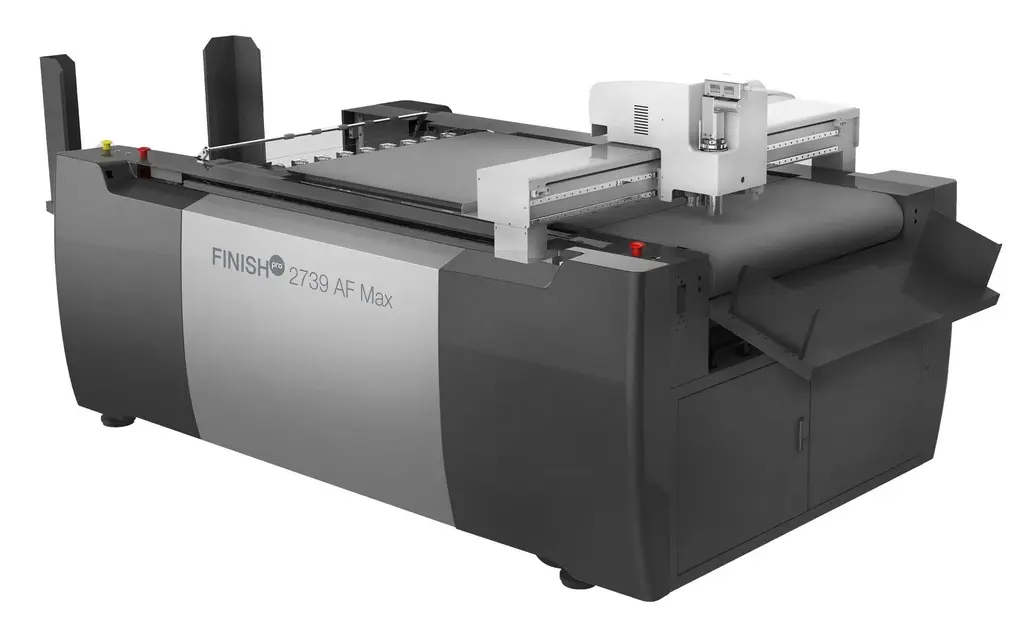
For example, the FINISHpro 2739 AF Max has a 39" × 28" working area and is designed to handle a wider range of materials, including foam board, cardboard, magnetic sticker stock, and corrugated plastic. It also supports multiple cutting tools, including an oscillating tool and creasing wheel. For shops producing larger signage, packaging prototypes, displays, or specialty pieces, understanding the range of digital die cutting applications can be just as important as comparing cutting speed.
Digital vs Traditional Die Cutting
Traditional die cutting can hold an advantage on high volume, repeat work. Once a steel rule or rotary die is built, it can cut large quantities of the same shape at a lower cost per unit than a digital system. For long, repeat runs, the upfront tooling cost can be balanced by faster production and a lower cost per finished piece.
For sufficiently long, repeat runs, the upfront tooling cost can be offset by faster production and a lower cost per finished piece.
Digital die cutting is the better fit in most other scenarios:
- Turnaround. Without tooling to wait on, a job can move from file to finished cut the same day.
- Short runs and prototypes. For small quantities or pieces being tested before a larger commitment, the cost of a physical die is difficult to justify.
- Design changes. A shape revision with a die means a new die. With a digital file, it's an edit.
- Storage. There's no die library to maintain, no bins to search through, and no dies sitting unused after a one-time job.
For shops considering whether digital cutting can open up new types of work, real-world results can be just as useful as machine specifications. AlphaGraphics Seattle noted how the FINISHpro digital die cutter brought more finishing capabilities in-house and allowed the business to take on work that had previously been turned away or outsourced. Read how AlphaGraphics Seattle generated $275K in new business with digital die cutting.
The trade-off is that traditional die cutting can remain the more efficient choice for large, repeat runs of an established shape, while digital cutting offers more flexibility when the work changes from job to job.
Both methods have their place. The right choice depends on the volume, materials, shape, and production requirements of the job.
The Bottom Line
The real advantage of digital die cutting isn't simply cutting without a physical die. It's having fewer limitations between the idea on the screen and the finished piece in your hands.
When shapes, materials, and designs can change without rebuilding the production process around them, print shops have more room to experiment, respond to new requests, and produce work that's harder to achieve with conventional methods.
That's the opportunity behind digital finishing, and it's what we help print shops explore here at Skandacor. With FINISHpro, we're helping businesses across Canada, USA, Europe, and beyond turn more ideas into finished print.